
MATLAB & Simulink for Control Systems and Robotics
Interactive Audio Lesson
Listen to a student-teacher conversation explaining the topic in a relatable way.
Introduction to MATLAB and Simulink
🔒 Unlock Audio Lesson
Sign up and enroll to listen to this audio lesson

Welcome, everyone! Today we’re going to explore MATLAB and Simulink. Can anyone tell me what you know about these tools?

I think MATLAB is used mainly for mathematical computations.
Great point! MATLAB excels at numerical analysis. Simulink, which is integrated with MATLAB, specializes in dynamic system simulation. So, let’s remember M&M - ‘Model & Math’ for MATLAB and Simulink.

Can we use them for robotics?
Absolutely! Both platforms are vital for robotics applications. They help simulate and validate designs before hardware implementation. Can you think of a reason why we want to validate designs before building them?

To save costs and avoid mistakes in hardware?
Exactly! Think of it as doing a dry run. So, these tools help us minimize risks. Let’s wrap this up. We covered that MATLAB performs calculations while Simulink simulates systems. Remember M&M - Model & Math!
Controller Design in Simulink
🔒 Unlock Audio Lesson
Sign up and enroll to listen to this audio lesson

Now, let’s talk about controller design using Simulink! Can someone explain what we mean by a controller in systems?

Isn’t it something that manages how outputs respond to inputs?
Exactly! Controllers balance system performance. In Simulink, we can use tools to design PID controllers. What does PID stand for?
Proportional, Integral, and Derivative!
Well done! A simple way to remember is 'P-I-D: Perfectly Improving Dynamics.' Who can tell me how we use Simulink to design these controllers?
We can tune them interactively.
Exactly! Simulink allows us to visualize the changes we make and their effects. Let’s summarize: Controllers manage outputs, PID controllers are crucial, and Simulink provides tools for interactive tuning. Remember P-I-D: Perfectly Improving Dynamics!
Performance Analysis of Systems
🔒 Unlock Audio Lesson
Sign up and enroll to listen to this audio lesson
Let’s shift gears and discuss how we analyze system performance in terms of time and frequency domain. What metrics do you think we should consider?
Things like overshoot and response time?
Correct! These are crucial in determining how well our system performs. To help you remember, think of ‘OTR’ - Overshoot, Time, and Response. What does overshoot mean?
It’s when the output exceeds the desired level?
Correct! Analyzing these metrics helps us to tune our controllers effectively. To recap: remember OTR for Overshoot, Time, and Response when measuring performance!
Real-World Applications and Examples
🔒 Unlock Audio Lesson
Sign up and enroll to listen to this audio lesson
Finally, let’s look at some real-world applications of MATLAB and Simulink. Can anyone give an example of a project you might simulate?
Simulating a robotic arm?
Yes! Simulating robotic arms lets us analyze kinematics and control strategies. Another example is tuning a PID controller for a motor. Why do you think those are significant?
They help understand complex motions and interactions in robotics.
Exactly! Using simulated environments saves time and resources. To summarize, we’ve discussed robotic arms and PID controllers as significant projects in MATLAB and Simulink simulations.
Introduction & Overview
Read summaries of the section's main ideas at different levels of detail.
Quick Overview
Standard
MATLAB and Simulink provide essential tools for modeling and simulating systems, enabling the design of controllers, and facilitating educational demonstrations in control systems and robotics. This section also discusses how these platforms contribute to various projects and their unique features compared to other software.
Detailed
Detailed Summary
Overview
Simulation software is pivotal in control systems and robotics engineering. Essential platforms like MATLAB/Simulink make it possible to model, analyze, and validate designs before implementing them in hardware. This section emphasizes MATLAB and Simulink's capabilities while briefly noting other options like Scilab/Xcos and RoboDK.
Key Features
- Modeling and Simulation: Offers extensive tools for both linear and nonlinear system dynamics, which allow users to optimize control algorithms and assess mechanical and robotics performance.
- Controller Design: Engages users with interactive design for various controllers (PID, LQR, LQG) utilizing graphical tools such as root locus and Bode plots.
- Time and Frequency Domain Analysis: Evaluates system performances through metrics like overshoot, rise time, and phase margins.
- Automatic Code Generation: Facilitates deploying algorithms to embedded devices, enhancing practical applications.
- Teaching and Demonstration: Utilizes block diagram environments to aid in educational contexts.
Example Projects
- PID Controller Design: Implementation and tuning via Simulink for automation tasks.
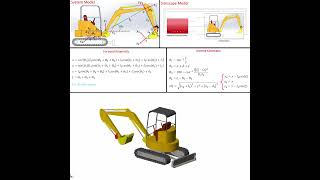
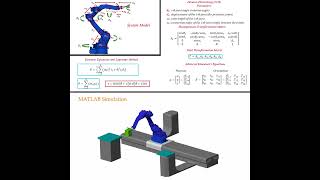
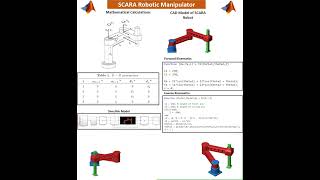
- Robot Arm Kinematics: Simulating motion characteristics and inverse kinematics.
- Path Planning: Algorithms for navigating mobile robots are tested.
- Hardware-in-the-Loop Testing: Integration of simulations with hardware to validate systems.
This section sets a foundation for understanding how these computational tools are integral to advancements in control systems and robotics.
Youtube Videos

Audio Book
Dive deep into the subject with an immersive audiobook experience.
Key Features Overview
Chapter 1 of 6
🔒 Unlock Audio Chapter
Sign up and enroll to access the full audio experience
Chapter Content
MATLAB and Simulink provide tools to model linear and nonlinear plant dynamics. Users can simulate, analyze, and optimize the performance of control algorithms, mechanical systems, and robotics applications.
Detailed Explanation
MATLAB and Simulink are powerful computational tools used in control systems and robotics. They allow engineers to create models that represent physical systems, which can include anything from simple mechanical components to complex robotic structures. By simulating these models, users can test how they would respond under various conditions, analyze performance, and make necessary adjustments to improve efficiency before implementing physical prototypes.
Examples & Analogies
Imagine you are designing a new car engine. Instead of building a physical engine and testing it (which can be costly and time-consuming), you first create a virtual model of the engine in MATLAB. You can then simulate how it would perform under different speeds and loads, allowing you to refine its design before any metal is cut.
Controller Design Capabilities
Chapter 2 of 6
🔒 Unlock Audio Chapter
Sign up and enroll to access the full audio experience
Chapter Content
Supports interactive design and tuning of PID, LQR, LQG, model predictive controllers, and more using tools like root locus, Bode plots, and frequency response analysis.
Detailed Explanation
MATLAB and Simulink support several controller design techniques, which are essential in ensuring that systems behave as desired. PID (Proportional-Integral-Derivative) controllers are one common approach used in many applications to maintain system outputs at desired levels by adjusting control inputs. The software also allows for advanced control strategies like LQR (Linear Quadratic Regulator) and LQG (Linear Quadratic Gaussian) controllers. Engineers can visualize and tune their controllers interactively using graphical plots that show how changes affect system behavior in real-time.
Examples & Analogies
Think of it like adjusting the temperature on your home thermostat. When it's too hot or too cold, you tweak the settings to get comfortable again. In control system design, engineers do something similar but on a much larger and more complex scale, ensuring that systems respond just right to their inputs.
Time and Frequency Domain Analysis
Chapter 3 of 6
🔒 Unlock Audio Chapter
Sign up and enroll to access the full audio experience
Chapter Content
Analyze system performance via overshoot, rise time, phase/gain margins, and system response characteristics.
Detailed Explanation
In control systems, understanding how a system behaves over time and frequency is critical for performance assessment. The time domain analysis looks at how variables change with time—like how quickly a system reaches a desired state (rise time) or how much it exceeds the target value (overshoot). Frequency domain analysis, on the other hand, examines how a system responds to different frequencies of input signals, helping engineers design systems that perform well under all expected conditions.
Examples & Analogies
Consider a car accelerating to a stoplight. You want to know how quickly it can stop without overshooting the stop line. In this analogy, the car's response time and performance characteristics when it brakes could be represented mathematically, allowing engineers to optimize braking systems in vehicles using tools like MATLAB.
Automatic Code Generation Feature
Chapter 4 of 6
🔒 Unlock Audio Chapter
Sign up and enroll to access the full audio experience
Chapter Content
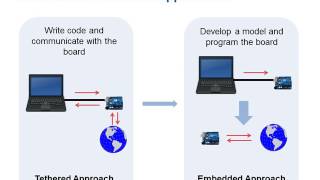
Enables deployment of control algorithms onto embedded hardware.
Detailed Explanation
One of the major advantages of using MATLAB and Simulink is the ability to automatically generate code for embedded systems. This means that once the control algorithm has been designed and tested within MATLAB, it can be automatically converted into C or C++ code, which can then be deployed directly onto hardware such as microcontrollers or PLC systems. This streamlines the development process and reduces the potential for errors that might occur if the code were written manually.
Examples & Analogies
Imagine using a translation tool to convert a recipe from your native language into English before cooking it. MATLAB serves as a translator for algorithms from the design phase into coding language ready for actual hardware implementation, ensuring the recipe works precisely as intended in a new setting.
Teaching and Demonstration Tools
Chapter 5 of 6
🔒 Unlock Audio Chapter
Sign up and enroll to access the full audio experience
Chapter Content
Provides block diagram environments for interactive demonstrations and student engagement.
Detailed Explanation
MATLAB and Simulink include educational tools that allow instructors to create interactive demonstrations using block diagrams. These block diagrams resemble flowcharts and visually represent how different components of a system interact. This graphical interface makes it easier for students to grasp complex concepts, as they can manipulate variables and immediately see the results of their changes in a controlled environment.
Examples & Analogies
Think of it as using a video game to teach students about physics. When students can play with different settings and see instant results, they are more likely to engage with and understand the material compared to reading a textbook.
Example Projects Overview
Chapter 6 of 6
🔒 Unlock Audio Chapter
Sign up and enroll to access the full audio experience
Chapter Content
- PID Controller Design: Simulating and tuning PID controllers for motors or process plants using Simulink. 2. Robot Arm Kinematics: Simulating direct and inverse kinematics of robotic manipulators. 3. Path Planning and Trajectory Tracking: Designing and testing algorithms for mobile robots in dynamic environments. 4. Hardware-in-the-Loop (HIL) Testing: Integrate simulation with hardware for early validation of embedded control systems.
Detailed Explanation
MATLAB and Simulink offer various example projects that illustrate the application of their tools. For instance, simulating and tuning a PID controller allows users to adjust the controller settings to optimize performance for motors. The robotic arm kinematics project teaches users how to manage the position and movement of robotic arms using mathematical models for direct (forward) and inverse (backward) calculations. Path planning projects help students design robust algorithms that aid mobile robots in navigating dynamic environments safely and efficiently. Lastly, Hardware-in-the-Loop Testing effectively integrates simulations with real hardware systems, validating algorithms in real-time, and ensuring they meet performance standards before full-scale implementation.
Examples & Analogies
Imagine preparing for a school science fair. You practice presenting your project (similar to simulating with MATLAB) and might even create a smaller version of your project to test how it works before the actual presentation (like HIL testing). The more you practice and refine, the better prepared you are for the actual event.
Key Concepts
-
Modeling: The creation of simulations that represent physical systems.
-
Simulation: Running models to understand behavior and performance.
-
Controller Design: The process involved in developing how a system responds.
-
PID Controller: A system controller used to maintain desired outcomes based on proportional, integral, and derivative calculations.
-
Kinematics: The analysis of motion, providing insight into robotic function.
-
HIL Testing: A method that combines simulation with real hardware to enhance system validation.
Examples & Applications
Simulating a PID controller in Simulink to manage a motor’s speed.
Using MATLAB to develop algorithms for optimizing the path of a robotic arm.
Memory Aids
Interactive tools to help you remember key concepts
Rhymes
In systems we strive and seek to control, P-I-D helps us reach our goal.
Stories
Imagine a robot arm building toys; it must listen to control commands to produce joy.
Memory Tools
Remember HIL - Hardware Interacts with Logic to make your simulations right!
Acronyms
M&M for MATLAB and Simulink, focusing on Modeling and Math!
Flash Cards
Glossary
- Modeling
Creating representations of systems to understand their behavior.
- Simulation
Running a model in a controlled environment to predict its performance.
- Controller Design
The process of creating algorithms that manage the behavior of dynamic systems.
- PID Controller
A control loop mechanism that uses Proportional, Integral, and Derivative parameters.
- Kinematics
The study of motion without considering its causes.
- HardwareintheLoop (HIL) Testing
A technique that involves integrating simulation with actual hardware to improve validation.
- Automatic Code Generation
The process of converting algorithms into executable code automatically.
Reference links
Supplementary resources to enhance your learning experience.