
Verilog Basics and Lexical Conventions
Interactive Audio Lesson
Listen to a student-teacher conversation explaining the topic in a relatable way.
Keywords and Identifiers
🔒 Unlock Audio Lesson
Sign up and enroll to listen to this audio lesson

Today, we are starting with the most fundamental aspects of Verilog — keywords and identifiers. Keywords like `module`, `input`, and `output` are reserved words. Can anyone tell me why we can't use these as identifiers?

Because they have specific meanings in the language, right?
Exactly! Keywords have predefined functions. Now, identifiers are names we choose for our variables. For example, identifiers must start with a letter or an underscore. Can someone give me an example of a valid identifier?

How about `my_signal`?
Perfect! That's a valid identifier. Remember, identifiers are case-sensitive, so `My_Signal` and `my_signal` are different. Let's reinforce that. If I declare both, how would you differentiate them?

We would treat them as two separate variables, since one starts with a capital letter!
Excellent! Keywords, identifiers, and their utilizations create a strong foundation for Verilog coding.
Data Types
🔒 Unlock Audio Lesson
Sign up and enroll to listen to this audio lesson

Now, let’s talk about data types in Verilog. What do you think the difference is between nets and registers?

Nets represent connections while registers store values, right?
Exactly! Nets do not retain values and get their assignments from drivers. Can someone tell me a possible state of a net?
It can be high-impedance or unknown.
Correct! High-impedance `z` and unknown `x` states are crucial for modeling real-world conditions. Meanwhile, registers do retain values until they are reassigned. Why do you think this distinction is important in hardware design?
It defines how components interact, especially in sequential logic.
Absolutely! Understanding these distinctions greatly impacts reliable circuit design.
Operators and Their Functions
🔒 Unlock Audio Lesson
Sign up and enroll to listen to this audio lesson
Let's discuss operators now. What types of operators do you think we need to describe circuits in Verilog?
We need arithmetic operators for calculations, right?
Yes, but we also need relational and logical operators. What's the main difference between logical and bitwise operators?
Logical operators work with single bits and return 0 or 1, while bitwise operators manipulate each bit independently.
Great explanation! Can anyone give me an example of using the conditional operator in Verilog?
I think an example would be `assign Y = (S) ? A : B;` where Y changes based on the select signal S.
Exactly right! The conditional operator is especially useful in modeling multiplexers. Understanding these operators allows for powerful circuit representations.
Introduction & Overview
Read summaries of the section's main ideas at different levels of detail.
Quick Overview
Standard
The section covers the fundamental building blocks of Verilog HDL, explaining important concepts such as keywords, identifiers, comments, data types (nets and registers), literals, and operators. Understanding these conventions helps in writing effective Verilog code for hardware description and design.
Detailed
Detailed Summary of Verilog Basics and Lexical Conventions
This section dives deep into the essential components that form the basis of the Verilog Hardware Description Language (HDL). Verilog is crucial for designing digital circuits, and understanding these building blocks is vital for effective coding and circuit representation.
Keywords, Identifiers, Comments, and White Spaces
Verilog has reserved keywords such as module, input, output, wire, and reg, which play significant roles in code structure but cannot be used as identifiers. Identifiers, on the other hand, are user-defined names for variables and must start with a letter or underscore. Comments in Verilog, denoted by // for single lines and /* */ for multi-line comments, enhance code readability. White spaces are generally ignored by the compiler but are essential for organizing code layout.
Data Types
Verilog classifies data types primarily into:
- Nets (Wires): Represent physical connections and do not store values. They are continuously driven by connected components and have the potential for high-impedance (z) or unknown (x) states.
- Registers (Variables): Store values until assigned anew, functioning as storage elements such as flip-flops. They are declared using the reg type.
- Other types include integers, time, real numbers (for simulations), and parameters for constant values. These types facilitate accurate hardware modeling...
Literals and Operators
Literals provide a way to represent numbers and strings in various formats, enabling designers to define values directly in their code. Operators in Verilog allow for computations and logical operations necessary for circuit design; these include arithmetic, relational, logical, bitwise, reduction, shift, concatenation, and conditional operators.
Overall, the mastery of these Verilog basics and lexical conventions lays the groundwork for students to write sophisticated hardware descriptions and to engage in more complex design and synthesis tasks.
Youtube Videos








Audio Book
Dive deep into the subject with an immersive audiobook experience.
Keywords, Identifiers, Comments, and White Spaces
Chapter 1 of 4
🔒 Unlock Audio Chapter
Sign up and enroll to access the full audio experience
Chapter Content
Keywords, Identifiers, Comments, White Spaces
- Keywords: Reserved words in Verilog that have special meaning (e.g., module, endmodule, input, output, wire, reg, assign, always, initial). These cannot be used as identifiers. All keywords are lowercase.
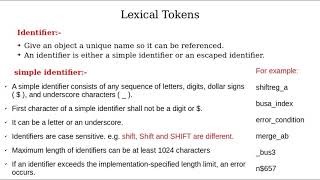
- Identifiers: Names given to objects in the design, such as modules, ports, signals (wires, registers), and parameters. They must start with a letter or underscore, followed by letters, numbers, underscores, or dollar signs. They are case-sensitive (e.g., my_signal is different from My_Signal).
- Comments: Used to explain the code and are ignored by the compiler/synthesizer.
- Single-line comments: Start with // and extend to the end of the line.
- Multi-line comments: Enclosed between / and /.
- White Spaces: Spaces, tabs, newlines are generally ignored by the Verilog compiler, used to improve code readability.
Detailed Explanation
In Verilog, certain words have special meanings. These special words are known as keywords and cannot be used to name other elements (identifiers) in your code. Identifiers are how you name various elements in the code, such as modules and signals. When naming identifiers, start with a letter or an underscore, and you can use letters, numbers, and underscores thereafter. Remember that identifiers are case-sensitive, meaning 'my_signal' and 'My_Signal' are considered different identifiers. Comments are essential for explaining your code and are ignored during compilation. Comments can be on a single line or span multiple lines. White spaces help make your code easier to read but do not affect how it works since they are ignored by the compiler.
Examples & Analogies
Think of keywords like traffic signals which give commands (stop, go, yield) that drivers must follow. Identifiers, like street names, uniquely identify different locations (modules, signals) on your code map. Comments are like road signs that give directions or insights, while white spaces act like comfortable gaps between buildings that make areas easier to navigate. Just like following road rules makes driving safer, following these coding conventions ensures your Verilog code is clear and effective.
Data Types: Nets, Registers, and Other Types
Chapter 2 of 4
🔒 Unlock Audio Chapter
Sign up and enroll to access the full audio experience
Chapter Content
Data Types: Nets, Registers, and Other Types
Verilog categorizes data into types based on how they store and transmit values, reflecting actual hardware behavior.
- Nets (or Wires):
- Representation: Represent physical connections between hardware elements (e.g., wires on a circuit board).
- Behavior: Nets do not store a value; their value is continuously driven by the output of a connected component. If nothing drives a net, its value is high-impedance (z). If multiple drivers conflict, the value becomes unknown (x).
- Declaration:
wireis the most common net type. Others includetri,wand,wor(for wired-AND/OR logic). -
Example:
wire enable_signal;orwire [7:0] data_bus;(for an 8-bit bus). - Registers (or Variables):
- Representation: Represent data storage elements in hardware (e.g., flip-flops, latches).
- Behavior: Registers store a value until a new value is explicitly assigned to them.
- Declaration:
regis the common register type used inside initial and always procedural blocks. -
Example:
reg control_state;orreg [15:0] count_value;. - Other Important Types:
- Integer: Used for loop counters. Defaults to 32-bit signed.
- Time: A 64-bit quantity for simulation timing.
- Real/Realtime: For floating-point numbers, used in simulations only.
- Parameters: Constant values declared using the keyword
parameter, enhancing code readability. - Example:
parameter DATA_WIDTH = 8;.
Detailed Explanation
Verilog has different data types that simulate how real hardware works. Nets (like wires) are used for connections in circuits; their values change continuously based on what drives them, meaning they don't hold values but relay them. In contrast, registers (like containers) store values until they're changed, making them essential for memory storage in hardware designs. Other types include integers for numerical purposes, time data for keeping track of simulation time, and parameter types for constants that enhance understanding and adaptability of the code.
Examples & Analogies
Imagine nets as postal mail carriers delivering messages—they don’t keep the messages themselves but pass them along based on what’s been sent. Registers, on the other hand, are like filing cabinets that store documents (data) until you decide to replace them with new ones. Other types in Verilog are like tools in a toolbox that let you accomplish specific tasks, like counting or timing, which are vital in both the real world and hardware design.
Literals: Number and String Representation
Chapter 3 of 4
🔒 Unlock Audio Chapter
Sign up and enroll to access the full audio experience
Chapter Content
Literals: Number and String Representation
- Number Literals:
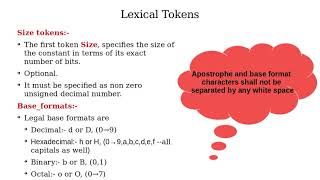
- Syntax: size'base_format value.
- size: Optional, currently specifying bit width (e.g., 8 for 8 bits).
- base_format: Specifies the number base:
'bor'Bfor binary (e.g.,4'b1011)'oor'Ofor octal (e.g.,12'o77)'dor'Dfor decimal (e.g.,16'd255)'hor'Hfor hexadecimal (e.g.,8'hFF)
- value: The number itself.
- Default Size: If omitted, typically 32 bits.
- Underscore (_): Allowed in numbers for readability, ignored by the compiler.
- Unknown (x) and High-Impedance (z): Can be included in numbers.
- String Literals: Enclosed in double quotes (e.g., "Hello World!"). Used mainly for displaying messages in testbenches.
Detailed Explanation
In Verilog, you can represent numbers in various formats: binary, octal, decimal, and hexadecimal, depending on the base you need. Each format has specific syntax. For example, you may define an 8-bit binary number as 8'b10101010. Strings, enclosed in quotes, allow you to represent textual data, which can be displayed during simulations for debugging or output verification purposes.
Examples & Analogies
Numbers in Verilog are like different languages for counting: just as you might say 'ten' in English, 'diez' in Spanish, or '10' in mathematics, Verilog allows you to express numeric values in the format that works best for your circumstance. Strings are like text message alerts—you can send a message wrapped in quotes, making it easy for someone to read and understand.
Operators: The Actions of Hardware
Chapter 4 of 4
🔒 Unlock Audio Chapter
Sign up and enroll to access the full audio experience
Chapter Content
Operators: The Actions of Hardware
- Arithmetic Operators: + (addition), - (subtraction), * (multiplication), / (division), % (modulo), ** (power - non-synthesizable).
- Relational Operators: >, <, >=, <=, == (equality), != (inequality), === (case equality), !== (case inequality). Used for comparisons.
- Logical Operators: && (logical AND), || (logical OR), ! (logical NOT). Operate on single-bit (boolean) operands; return 0 or 1.
- Bitwise Operators: & (bitwise AND), | (bitwise OR), ~ (bitwise NOT), ^ (bitwise XOR), ~^ or ^~ (bitwise XNOR). Operate bit by bit on operands.
- Reduction Operators: Used to produce a single-bit result from multi-bit operands.
- Shift Operators: Used for bit manipulation. Preserve sign bit for signed numbers.
- Concatenation Operator: {} (e.g., {A, B, C} concatenates signals).
- Replication Operator: {num_copies {vector}} (e.g., {4{1'b1}} creates
4'b1111). - Conditional Operator (Ternary Operator):
condition ? true_expression : false_expression. Used in dataflow modeling.
Detailed Explanation
Verilog supports several categories of operators that facilitate operations on data. Arithmetic operators perform calculations, relational operators compare values, and logical operators work with boolean conditions. Bitwise operations enable manipulation of individual bits within binary representations. Shift operators adjust the position of bits, while concatenation and replication operators allow the combination of multiple bits or values into larger structures. The conditional operator provides a concise way to express if-else logic in single lines.
Examples & Analogies
Think of operators in Verilog like various tools in a toolbox. Arithmetic operators are like hammers and screwdrivers, allowing you to build and modify structures (calculations). Relational operators work like scales, weighing items against each other to see which is heavier or lighter. Meanwhile, logical operators are akin to traffic lights that guide decisions (true or false). The shift and concatenation operators let you arrange or combine elements, just as reorganizing furniture can change the look of a room.
Key Concepts
-
Keywords: Reserved terms that dictate syntax and structure in Verilog coding.
-
Identifiers: User-defined names used to refer to objects and signals in a design.
-
Nets and Registers: Distinction between non-storing connection types and storage types.
-
Literals: Representations of fixed values within Verilog coding.
-
Operators: Functional symbols that dictate operations on operands.
Examples & Applications
Example of a keyword: input, output in module declarations.
Example of an identifier: my_signal which follows naming conventions and is case-sensitive.
Example of a net type: wire [3:0] data_bus; to declare a 4-bit bus.
Example of a register type: reg [7:0] counter; to store an 8-bit value.
Memory Aids
Interactive tools to help you remember key concepts
Rhymes
Keywords reserved, identifiers named, in coding's game, it's all the same.
Stories
Imagine a bustling factory where wires are the workers connecting machines (nets), while registers are the storerooms keeping finished products until the next task.
Memory Tools
Remember KID for Keywords, Identifiers, Data types.
Acronyms
L.O.N. for Literals, Operators, Nets.
Flash Cards
Glossary
- Keywords
Reserved words in Verilog that have special meanings and cannot be used as identifiers.
- Identifiers
Names given to objects in the design like modules, ports, and signals that represent elements in a Verilog design.
- Nets
Data types that represent physical connections between hardware elements; do not store values.
- Registers
Data types that represent storage elements in hardware that hold their last assigned value.
- Operands
Symbols used in expressions that represent values or variables upon which operators perform operations.
- Literals
Fixed values or constants used in Verilog, such as numbers and strings that can be directly assigned.
- Operators
Symbols that specify operations to be performed on operands, like arithmetic or logical operations.
Reference links
Supplementary resources to enhance your learning experience.