
ALTER TABLE Statement
Interactive Audio Lesson
Listen to a student-teacher conversation explaining the topic in a relatable way.
Overview of ALTER TABLE
🔒 Unlock Audio Lesson
Sign up and enroll to listen to this audio lesson

Today, we're going to explore the ALTER TABLE statement. Who can tell me what this statement is used for?

Is it used to change the structure of an existing table?
Exactly, Student_1! The ALTER TABLE command allows us to modify the structure of an existing table in various ways. Can anyone give me a specific example of what alterations we can make?

We can add new columns to the table!
Correct, Student_2! Adding new columns is one common operation. We can also drop columns, modify their data types, or even add and remove constraints.

What happens if we drop a column? Does that delete all its data?
That's a great question, Student_3! Yes, dropping a column permanently deletes all the data in that column. So, it's crucial to be cautious when using that command.

Can we add constraints after the table is created?
Absolutely, Student_4! We can add constraints using the ALTER TABLE statement to ensure data integrity. Let's remember to keep our tables flexible as our database needs evolve.
In summary, the ALTER TABLE statement is essential for modifying existing tables, including operations such as adding, dropping, and modifying columns and constraints. Monitoring these changes helps us maintain a robust database.
Adding and Dropping Columns
🔒 Unlock Audio Lesson
Sign up and enroll to listen to this audio lesson

Let's dive deeper into two specific operations: adding and dropping columns. How would we add a new column to a table?
We use the ALTER TABLE statement followed by ADD COLUMN, right?
That's correct! The syntax looks like this: ALTER TABLE table_name ADD COLUMN new_column_name data_type. Can anyone give me an example?
For example, we could say, ALTER TABLE Students ADD COLUMN PhoneNumber VARCHAR(20);
Excellent, Student_2! Now, what about dropping a column? What is the syntax there?
We would say ALTER TABLE table_name DROP COLUMN column_name.
Exactly, Student_3! But remember, once a column is dropped, all its data is lost. Always ensure you have a backup if necessary.
Are there situations where we might need to drop a column?
Great thinking, Student_4! You may wish to remove a column if it becomes obsolete or if it contains redundant data. It’s significant to regularly assess the structure for optimization.
In summary, we can add columns using the ADD COLUMN command and drop columns using DROP COLUMN. It is essential to approach both operations with caution because of the potential loss of data.
Constraints Management
🔒 Unlock Audio Lesson
Sign up and enroll to listen to this audio lesson
Now, let’s talk about constraints. Why are they important when managing a database?
They help maintain data integrity, right?
Exactly, Student_1! Constraints ensure that the data meets certain rules. We can add constraints using the ALTER TABLE statement too. What is the syntax for adding a constraint?
We say ALTER TABLE table_name ADD CONSTRAINT constraint_name constraint_definition.
Correct! Now, can someone give me an example of adding a unique constraint?
Sure! We could use ALTER TABLE Students ADD CONSTRAINT UQ_Email UNIQUE (Email);
Perfect, Student_3! And how would we remove a constraint?
We would say ALTER TABLE table_name DROP CONSTRAINT constraint_name.
Absolutely! Removing constraints is just as important as adding them. It's essential to periodically review constraints to ensure relevance.
To summarize, constraints are crucial for maintaining data integrity. We can add or drop them using the ALTER TABLE statement, ensuring our database remains optimized and relevant.
Modifying Columns
🔒 Unlock Audio Lesson
Sign up and enroll to listen to this audio lesson
Lastly, let's discuss modifying existing columns. Can anyone tell me what that might involve?
Changing the data type of a column or its constraints?
Exactly! Modifying a column allows us to update its definition. Keep in mind that the syntax can differ among various RDBMS. What would be a general syntax for changing a column's datatype?
We could say ALTER TABLE table_name ALTER COLUMN column_name TYPE new_data_type.
Great! And why is it important to be cautious when modifying columns?
Because it might affect existing data or how the application interacts with the database!
Exactly, Student_3! Altering columns needs careful consideration. What other aspects can be modified besides the data type?
The constraints, right? Like making a column NOT NULL.
Yes! Modifying constraints is just as crucial. In conclusion, modifying columns with the ALTER TABLE statement allows flexibility in database management, but it requires caution to maintain data integrity.
Introduction & Overview
Read summaries of the section's main ideas at different levels of detail.
Quick Overview
Standard
The ALTER TABLE statement is an essential SQL command used to alter the structure of an existing table. It allows users to add or remove columns, change column properties, or add/remove constraints, thereby adapting the database schema to evolving requirements.
Detailed
In SQL, the ALTER TABLE statement is used to make modifications to the structure of an existing database table. This includes adding new columns, dropping existing ones, and modifying the definitions of columns or constraints. The ability to change a table's schema is crucial for database management as it allows developers to adapt to changing requirements without needing to recreate the entire table or database. To maintain data integrity and usability, SQL provides specific syntax for each operation under the ALTER TABLE command. The command also contains methods to add and drop constraints, manage the data types of columns, and ensure the smooth evolution of the database structure.
Youtube Videos




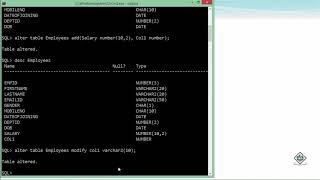

Audio Book
Dive deep into the subject with an immersive audiobook experience.
Introduction to ALTER TABLE
Chapter 1 of 6
🔒 Unlock Audio Chapter
Sign up and enroll to access the full audio experience
Chapter Content
The ALTER TABLE statement is used to modify the structure of an existing table. You can use it to add, drop, or modify columns, or to add and remove constraints.
Detailed Explanation
The ALTER TABLE statement serves as a crucial command when working with an already established table in SQL. It allows the flexibility to make changes without needing to create a new table and migrate data. This means if a table needs new information, it can easily be updated to accommodate that without losing existing data.
Examples & Analogies
Think of a library where a new section for biographies is needed. Instead of building a whole new library, you simply create new shelves and labels for that section. Similarly, ALTER TABLE adds or changes features of your table without starting over.
Adding a New Column
Chapter 2 of 6
🔒 Unlock Audio Chapter
Sign up and enroll to access the full audio experience
Chapter Content
Common ALTER TABLE operations:
Adding a New Column:
ALTER TABLE table_name
ADD COLUMN new_column_name data_type [constraint];
Example: ALTER TABLE Students ADD COLUMN PhoneNumber VARCHAR(20);
Detailed Explanation
To add a new column to an existing table, you utilize the ADD COLUMN command within the ALTER TABLE syntax. This is useful when there's a need for additional information that wasn't originally planned. For instance, if you want to track students' phone numbers, you can add a 'PhoneNumber' column easily.
Examples & Analogies
Imagine your classroom starts a project where students can submit their contact information. Rather than creating a new class list, you simply add a section for phone numbers to the existing list. This way, everyone's information is consolidated.
Dropping an Existing Column
Chapter 3 of 6
🔒 Unlock Audio Chapter
Sign up and enroll to access the full audio experience
Chapter Content
Dropping an Existing Column:
ALTER TABLE table_name
DROP COLUMN column_name;
Caution: This will permanently delete the column and all its data.
Example: ALTER TABLE Students DROP COLUMN PhoneNumber;
Detailed Explanation
The DROP COLUMN command is used to remove a column from a table when it is no longer necessary. It's crucial to understand that doing this will erase all the data within that column, so one must proceed with caution. For instance, if studies show that phone numbers aren't useful for your records, you might choose to eliminate that data.
Examples & Analogies
Consider getting rid of an old part of a garden that no longer fits your design. When you remove that part, it's gone for good. Similarly, using DROP COLUMN means removing that entire data segment from your table permanently.
Adding a Constraint
Chapter 4 of 6
🔒 Unlock Audio Chapter
Sign up and enroll to access the full audio experience
Chapter Content
Adding a Constraint (out-of-line syntax only for existing tables):
ALTER TABLE table_name
ADD CONSTRAINT constraint_name constraint_definition;
Example: ALTER TABLE Students ADD CONSTRAINT UQ_Email UNIQUE (Email);
Detailed Explanation
Constraints are rules applied to ensure data integrity within a table. The ADD CONSTRAINT command enhances the table by imposing specific restrictions on data entries. For instance, you can require that all email entries must be unique among all students, preventing duplicates.
Examples & Analogies
Think of rules in a game where certain moves are not allowed. Adding a constraint is like placing guidelines in a game to maintain fair play. In your database, these constraints keep the information organized and accurate.
Dropping a Constraint
Chapter 5 of 6
🔒 Unlock Audio Chapter
Sign up and enroll to access the full audio experience
Chapter Content
Dropping a Constraint:
ALTER TABLE table_name
DROP CONSTRAINT constraint_name; -- For named constraints
-- OR (depending on DBMS, for unnamed PRIMARY KEY/UNIQUE)
-- DROP PRIMARY KEY;
-- DROP UNIQUE (column_name);
Example: ALTER TABLE Students DROP CONSTRAINT UQ_Email;
Detailed Explanation
To remove a constraint applied on a table, you can use the DROP CONSTRAINT command. This action may be necessary if changes in business rules are implemented. For instance, if it is decided that multiple students can share the same email address, the unique constraint on emails would need to be dropped.
Examples & Analogies
Imagine a store enforcing a one-customer-one-discount rule. If they decide to allow multiple discounts for different customers, they would remove that rule. Similarly, without constraints, your database can be more flexible.
Modifying a Column's Data Type or Properties
Chapter 6 of 6
🔒 Unlock Audio Chapter
Sign up and enroll to access the full audio experience
Chapter Content
Modifying a Column's Data Type or Properties (DBMS-specific syntax):
Example (Conceptual for changing data type, actual syntax varies):
ALTER TABLE Students
ALTER COLUMN FirstName TYPE VARCHAR(100); -- PostgreSQL/MySQL style
Detailed Explanation
This command allows you to change the data type and properties of an existing column. The syntax for modification varies between different database management systems (DBMS) and may require checking the specific documentation of the DBMS you are using. For example, if you initially defined a student's first name with a shorter character limit, and later need more space, you can adjust the column to accommodate the changes.
Examples & Analogies
Think of your closet where you initially had it organized for seasonal clothes but later decide to switch to a more year-round organization. By adjusting the layout of your closet, you allow for flexibility. In a database, modifying a column allows you to adapt to changing needs.
Key Concepts
-
ALTER TABLE Command: Used to modify the structure of existing database tables.
-
Add Column Operation: Allows adding new columns to a table.
-
Drop Column Operation: Permanently deletes a column and its data.
-
Constraints: Rules that ensure data integrity in a table.
-
Modifying Columns: Changing the properties or data type of an existing column.
Examples & Applications
Example of adding a new column: ALTER TABLE Students ADD COLUMN PhoneNumber VARCHAR(20);
Example of dropping a column: ALTER TABLE Students DROP COLUMN PhoneNumber;
Example of adding a constraint: ALTER TABLE Students ADD CONSTRAINT UQ_Email UNIQUE (Email);
Example of modifying a column's data type: ALTER TABLE Students ALTER COLUMN FirstName TYPE VARCHAR(100);
Memory Aids
Interactive tools to help you remember key concepts
Rhymes
ALTER the table with care, add or drop, be aware!
Stories
Imagine an architect modifying a building's blueprint. Just as an architect must consider the impact of removing a wall, a database administrator must think carefully before dropping a column.
Memory Tools
ADD for adding columns, DROP for removing them, CONSTRAINT to maintain the rules, and MODIFY for changes.
Acronyms
A.C.D.M.
Add Column
Drop Column
Modify - the essentials of ALTER TABLE.
Flash Cards
Glossary
- ALTER TABLE
A SQL statement used to modify the structure of an existing table.
- Column
A vertical section in a table that holds a certain type of data.
- Constraint
A rule that limits the type of data that can go into a table to maintain integrity.
- Data Type
Defines the kind of data a column can store, such as INTEGER, VARCHAR, DATE, etc.
Reference links
Supplementary resources to enhance your learning experience.